

At the Location Intelligence Summit 2014 (LI2014) in Washington, Juan Marin, CTO at Boundless, gave an overview and demonstration of GeoGit, a distributed system for versioning geospatial data using the same philosophy as Git. Data versioning is also known as long transactions and is a fundamamental data management technology in a number of industries. For example, long transactions are used by utilities to protect their production as-built information (what is actually in the ground) with a process for managing updates and new network design work. Another example is OpenStreetMap (OSM) where there is a production OSM database that is continually being updated with crowd-sourced data. Data versioning is an ideal strategy for managing the updates and protecting the authoritative database.
Currently GeoGit users are able to import raw geospatial data from shapefiles, PostGIS or SpatiaLite into a repository where every change to the data is tracked. These changes can be viewed in a history, reverted to older versions, branched in to sandboxed areas, merged  back in, and pushed to remote repositories. GeoGit is written in Java, and available under the BSD License. GeoGit is a proposed LocationTech project. LocationTech is part of the Eclipse Foundation.
Git
By way of background Git is a distributed revision control and source code management (SCM) system. Git was initially designed and developed by Linus Torvalds for Linux kernel development in 2005. It is free open source software distributed under the GNU General Public License (GPL) V 2.
Every Git working directory is a full-fledged repository with complete history and full version tracking capabilities. Each local repository is standalone and is not dependent on network access to a central server. Git is known for very fast performance and for scalability. Git allows and encourages you to have multiple local branches that can be entirely independent of each other. One of the things this branching model allows you to do is to keep several concurrent branches, for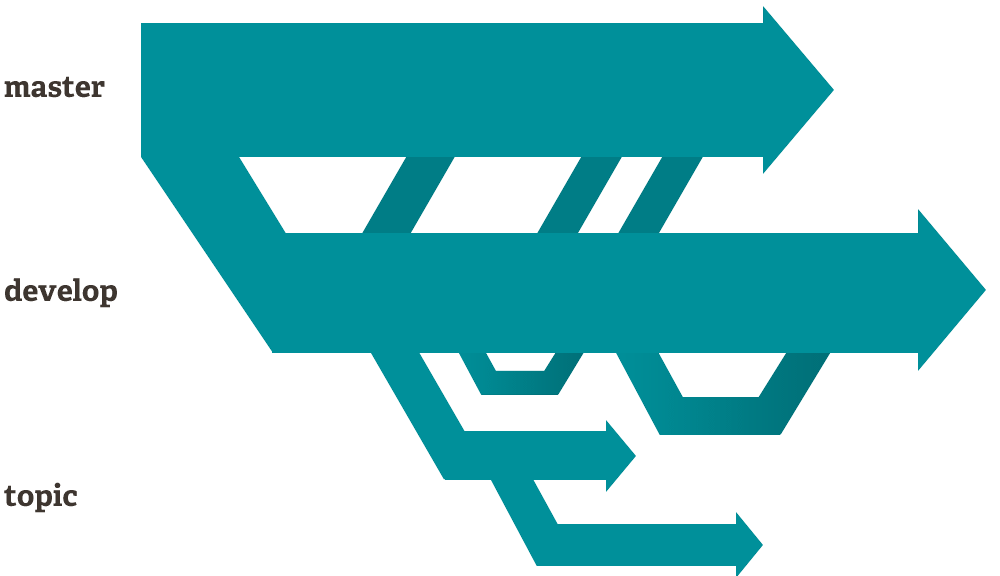 example,
- Production – one branch that contains only what goes to production
- Working – another branch that you merge new work into
- Several smaller ones for new features you’re working on so you can switch back and forth between them, then delete each branch when that feature gets merged into your main line
Pushing to remote repositories – When you push to a remote repository, you can choose to share one of your branches, several of them, or all of them. For example, you may only want to share your production branch. When you push your production repository to a remote repository (called a merge) which may have been updated by several other folks while you were working, Git will detect all conflicts and has a well-defined model of an incomplete merge. Git has multiple algorithms for completing the merge automatically. If it isn’t able to complete the merge automatically, manual editing will be required. The other important thing from a data flow perspective is that only the incremental changes are updated in the remote repository.
GeoGit
GeoGit is currently available as version 0.8. Juan says that it is feature complete with a complete command line interface (CLI). He projects that V1.0 of GeoGit will be available by the summer. In addition Integration with QGIS is in progress and it is expected that a tutorial with GeoGit running with QGIS will be available soon. GeoGit currently only supports vector data.
Perhaps the first question is why not just use Git and a well known geodata format such as shape or GeoJSON ? Juan pointed out that you can actually do this, but there are a couple of reasons why this may not be optimal. First of all, Git doesn’t support large binary files. Secondly, this isn’t well integrated into the geospatial ecosystem so you’ll have to do work to make sense of conflicts, for example.
Juan emphasized the advantages of the GeoGit approach
- No single point of failure – this is a distributed (peer to peer) geospatial data versioning system. As in Git everyone has a complete and independent copy of the repository.
- No single point of truth – this may not seem ideal, but as pointed out above the Git model enables you to maintain shared production and development branches.
- The GIt model is proven technology that enables scalable collaboration among remote developers
Juan described and demonstrated basic GeoGit processes including
1. Create a repository
2. Import geospatial data, for example, shape or OSM data, into the GeoGit staging area
geogit shp import [bounding box]
geogit osm import [bounding box]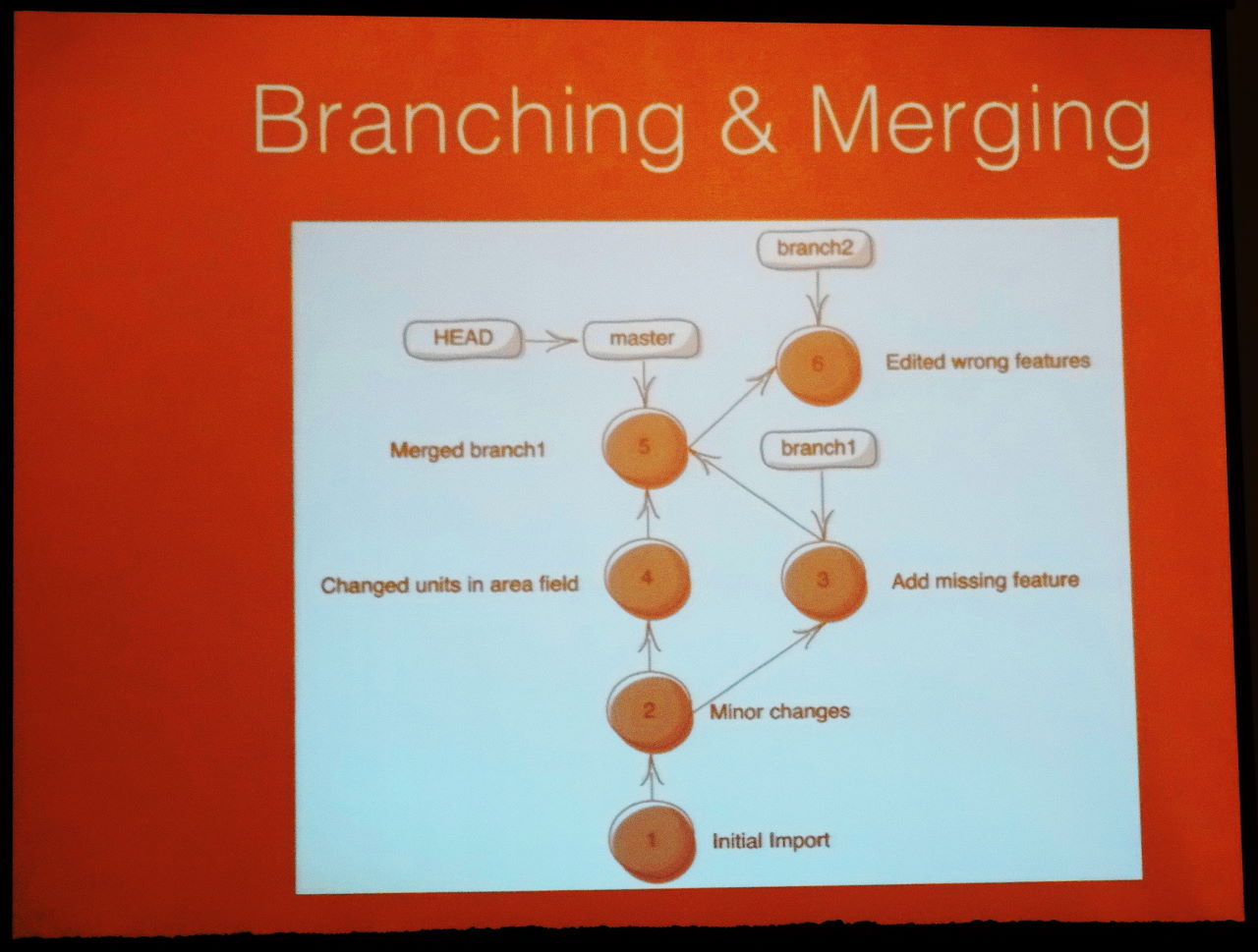
3. Edit it in the staging area
4. Commit the changes to the repository
geogit commit -m “first commit”
5. Create a branch
geogit branch <branch1>
6. Import or create some new data in the staging area, for example, digitize a building footprint polygon
7. Commit it
8. Merge it back into the main branch
geogit merge <branch1> <main>
Geogit will find, attempt to resolve and report conflicts
9. View history – view the main branch before and after the commit
10. Synchronize the repository with a remote repository
Geogit will find, attempt to resolve and report conflicts
11. Export the main branch as a shape file
geogit shp export
Following Juan’s presentation, Scott Clark, Director of Geospatial Prgrams al LMN Solutions, a solution provider to the intel community described and demonstrated an application for collaborative mapping developed for DoD as a Joint Capability Technology Demonstration (JCTD) that uses GeoGit in addition to other open source geospatial tools including GeoNode, PostGIS, and GeoServer.
Next steps
Juan outlined the main areas of focus for current and future development activities.
- High performance GeoGit server
- QGIS plug-in
- Web UI
- Python support
- Scalability – large repository support
- Performance optimization
Be the first to comment